


Basketball Career Sim 2026
4.419.00 Reviews
App Specs
- Version
- 1.0.4
- Updated On
- License
- Free
- Downloads
- 10,000+
- Developer
- Vule Games
- Categories
- Sports
- Platform
- Android
Screenshots
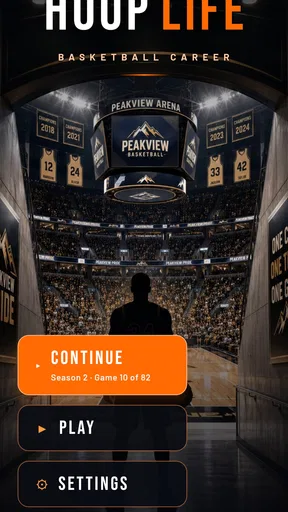
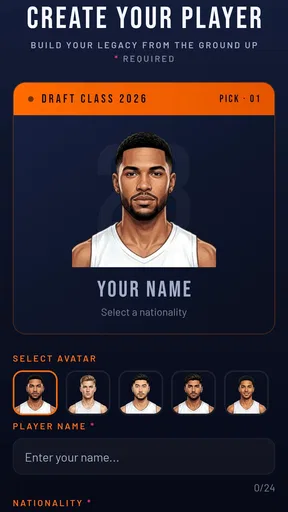
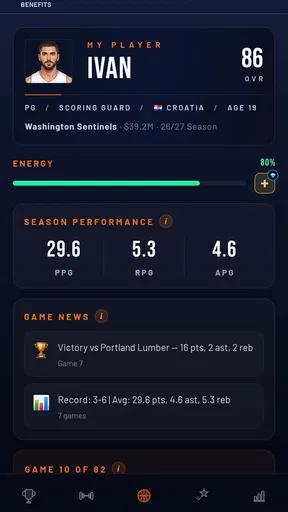
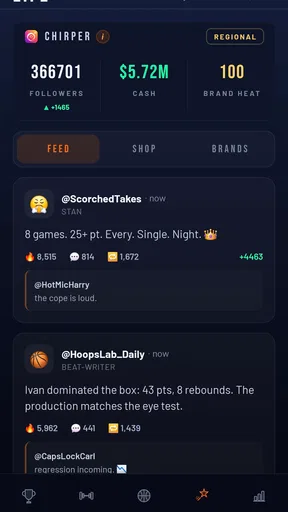
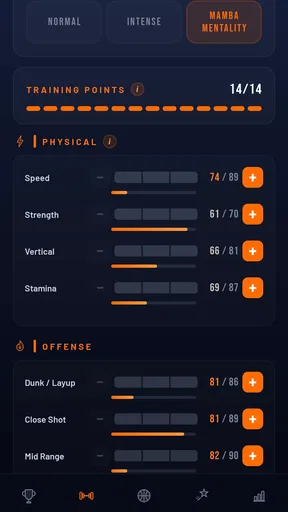
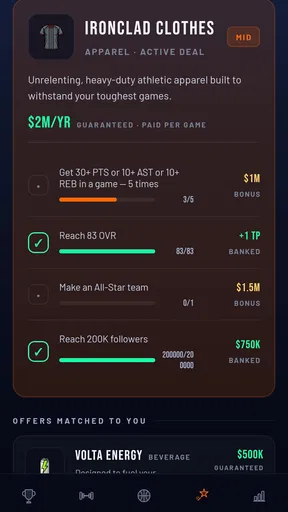
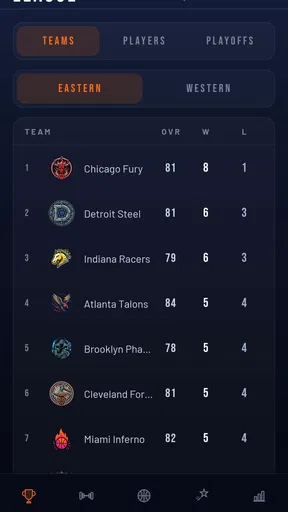
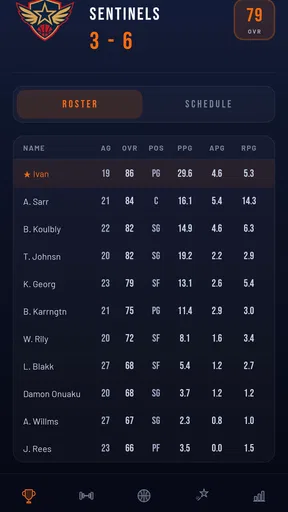
 Analysis by AppCompare
Basketball Career Sim 2026 caught my attention because it approaches basketball from the player’s point of view rather than asking me to coach an entire roster. Developed by Vule Games, this free sports game presents itself as a career-focused basketball experience that can be played offline. I spent time looking at it as the sort of game you might open during a commute, a break, or a quiet evening when you want progression without needing a constant connection.
The basic appeal is easy to understand: instead of treating every possession as a full team-management exercise, the game is built around the idea of living through a basketball career. That makes it more personal than a conventional league simulator, while still offering the planning and decision-making that sports fans expect from a management game. It is available for Everyone and supports devices running Android 7.0 or later, so the entry barrier is fairly low for compatible phones and tablets.
Getting started without unnecessary frustration
The first thing I would recommend is checking the device and installation basics before judging the game itself. The current release is version 1.0.4, and the game requires Android 7.0 or newer. If installation stops, the game closes immediately, or the store page does not offer it for your device, compatibility is the first place to look. Updating the operating system, freeing some storage, and restarting the device are simple steps, but they solve a surprising number of problems before any in-game troubleshooting is needed.
Because the experience is designed for offline play, I would install it while connected to a stable network and then test it once with the connection disabled. That gives you a clean idea of how the offline side behaves on your own device. It is also a useful habit if you plan to play while travelling: open the game once at home, let the initial setup finish, and avoid assuming that every first-run task can be completed after switching to airplane mode.
There is another practical point that is easy to overlook with offline games. Your progress is tied to the local installation environment more directly than it would be in a strongly online service. I would avoid clearing the app’s storage casually, uninstalling during a device cleanup, or moving between devices without first considering whether your progress will travel with you. This is not a criticism of the concept; it is simply the trade-off for being able to play without relying on a live connection.
The game is free to download, but it includes optional purchases ranging from $0.99 to $79.99 per item. I recommend deciding in advance whether you want to play without spending, especially if you tend to tap through purchase screens quickly. A free entry point is helpful, but the presence of optional purchases means the most comfortable approach is to treat spending as a deliberate choice rather than part of the normal setup routine.
On a first session, I would not rush through every screen just to reach the action. A career simulator usually becomes clearer when you notice what each decision changes. Pay attention to the relationship between short-term progress and long-term development, and look for any confirmation step before committing resources. That small pause can prevent the common mistake of using something valuable simply because the next button is visually prominent.
Worth Reading Before You Choose

Flipboard Shows What News Apps Must Do Beyond the Feed

Switching to Android Auto Means Rethinking Your Driving Routine

Google Calendar Makes a Crowded Week Easier to Manage

Ludo King Makes the Most of the Minutes Between Plans

Baby Panda World Brings Quick Play to Modern Phones, but Its Game Library Feels Busy

ESPN’s Live Game View Makes Following Close Games Easier
Where players are most likely to get stuck
The biggest adjustment is understanding that this is not the same as a quick arcade basketball game. If you expect immediate, possession-by-possession action, the career format may initially feel slower or more indirect. The satisfying part comes from seeing choices accumulate over time, so a player who wants instant shooting practice may prefer a traditional basketball action title instead.
Another likely sticking point is the balance between personal ambition and practical progression. A career game encourages you to think about the next step, but not every available improvement will be equally useful at every moment. My advice is to identify the kind of player experience you want before spending effort broadly. Are you trying to build a reliable all-rounder, specialize in a particular role, or simply experiment? Having that intention makes the menus feel less like a list of chores.
Offline play can also create confusion if you expect live updates, online competition, or cloud-style continuity. The offline promise is a strength for accessibility, but it naturally suits self-contained sessions better than a constantly changing multiplayer environment. If your favorite part of sports games is competing against friends in real time, this will not replace that experience.
When a screen seems not to respond, I would first check whether the game is waiting for a selection, confirmation, or completed action rather than assuming it has frozen. Give the interface a moment, tap once rather than repeatedly, and return to the previous screen if that option is available. Repeated taps can make it harder to tell whether the problem is a delay or an accidental double selection.
A sensible workflow for a first career
I found the most useful way to approach the game is in short, intentional sessions. Start by reviewing the current career situation, decide what you want to accomplish in that session, and only then move through the available actions. This prevents the game from becoming a sequence of random taps and makes the career arc easier to follow.
For example, imagine opening the game during a train ride with your connection unavailable. Rather than trying to complete every possible activity, you could review your current position, make one development decision, and stop after checking the result. That rhythm works well for an offline title because it gives each session a clear beginning and end. It also reduces the temptation to spend resources impulsively just because you have a few spare minutes.
A useful advanced habit is to keep mental notes about what changed after a decision. Did the next opportunity become easier, more demanding, or simply different? Did a choice improve immediate progress while narrowing your flexibility later? You do not need a spreadsheet, but remembering the cause and effect of your last few actions makes the simulation feel much more strategic.
If progress appears to stop, retrace the last completed action instead of restarting everything immediately. Check whether you left a selection unfinished, whether a result screen needs to be dismissed, or whether the game expects you to return to a career hub before the next event becomes available. This kind of workflow recovery is especially worthwhile in a progression game, where wiping local data can be far more damaging than patiently finding the missed step.
Restarting the app is reasonable if the interface genuinely becomes unresponsive. I would close it normally, reopen it, and test the same path once. If the issue repeats, try a different menu route and check that the device is not under heavy memory pressure. Closing several demanding apps in the background can help on older hardware without requiring aggressive changes to the game’s storage.
When the problem is probably outside the game
Not every failed session points to a software defect. If the phone is nearly full, overheating, running a battery-saving mode, or struggling with many background processes, performance can suffer across several applications. In that situation, the game may simply be revealing a wider device problem. A restart, some free storage, and a cooler device are sensible first steps.
Installation trouble can also come from the store account or operating system rather than the game. If other downloads are failing, pause those downloads, check the account you are using, and confirm that the device meets the minimum system requirement. If only this title is affected, compatibility or a temporary store issue becomes more likely than a general phone failure.
Offline games introduce a different kind of misunderstanding. If you switch off the connection before the initial setup has completed, a screen may not behave as expected even though later play is designed to work offline. My practical recommendation is to complete the first launch online, open the main career area, close the game normally, and then test offline play. That sequence separates setup friction from genuine gameplay behavior.
It is also worth being careful with device cleaners and automatic storage tools. Apps that remove cached files are usually harmless, but options that clear application data can reset local progress. I would treat the game’s stored data as valuable and avoid using a cleanup option unless I understood exactly what it would remove.
How it compares with familiar basketball alternatives
The strongest comparison is with arcade basketball games. Those titles are better when I want immediate control, quick matches, and a clear skill challenge in every minute of play. Basketball Career Sim 2026 is more appealing when I want to shape a longer personal journey and make decisions between moments of action. It is less about perfecting one shot and more about following the consequences of a developing career.
It also differs from full team-management games. A traditional manager gives me a wider view of squads, tactics, transfers, and league planning. That depth can be rewarding, but it can also feel like work when I only want to focus on one player’s path. This game’s narrower viewpoint is its main identity, although players who enjoy controlling every aspect of a club may find it too limited by comparison.
The offline design gives it a practical advantage over games that depend heavily on live services. I can imagine keeping it installed for flights, commutes, or places with unreliable reception. The trade-off is that it is not the right choice for someone seeking a lively online community, real-time opponents, or constantly refreshed competitive content.
Its public reception is encouraging without making it a guaranteed fit for everyone: the game holds a 4.4 average from around 200 ratings, with 18 written reviews and over 10K installs. I read those figures as a sign that the concept is connecting with a modest but interested audience, not as proof that every basketball fan will enjoy the pacing.
Who should try it, and who should skip it
I would recommend it to players who enjoy career progression, offline access, and making choices that feel more personal than managing an entire organization. It is especially suitable for someone who wants a basketball game that can be checked in short sessions rather than requiring a long uninterrupted match.
I would skip it if your priority is realistic live competition, deep club administration, or highly physical on-court control. Those needs are better served by a dedicated multiplayer basketball game, an arcade title, or a comprehensive team manager. The career-simulation format has a clear focus, and that focus means it cannot satisfy every interpretation of basketball gaming.
Parents should also note that the content rating is Everyone, which makes the game broadly accessible from an age-rating perspective. Even so, the optional purchase range means it is sensible to review device purchase controls before handing the phone to a child. That is a general precaution, but it matters here because the game is free to enter while still offering paid items.
My practical verdict
After looking at the complete experience, I see Basketball Career Sim 2026 as a focused sports game rather than a universal basketball replacement. Its best qualities are the personal career angle, the ability to play offline, and the lower technical entry point for compatible Android devices. I like that it can fit into small pockets of time without demanding the commitment of a full team-management session.
The main friction comes from knowing what kind of game it is. Players who arrive expecting constant action may mistake its career structure for a lack of content, while players who enjoy gradual decisions will probably understand the appeal much faster. The optional purchases also deserve attention, and local-progress habits matter more than they would in a game built entirely around an online account.
My recommendation is to install it, complete the first launch while connected, and begin with a cautious career plan rather than spending immediately. Test one offline session, notice how progress carries from one decision to the next, and decide whether that rhythm suits you. The smart way to enjoy this game is to treat it as a compact career journal, not as a replacement for every other kind of basketball game.
For me, that makes the title worth trying for fans of offline basketball management and superstar-career stories. It is free to start, rated for Everyone, and supported by a current release from Vule Games. As long as you want planning and progression more than nonstop court action, it offers a pleasant, practical way to keep a basketball career moving even when the internet is nowhere nearby.
Pros
- Detailed career progression keeps long-term saves engaging.
- Roster management adds depth beyond simply playing matches.
- Multiple seasons make the game suitable for quick daily sessions.
- Simple interface makes menus easy to navigate on mobile devices.
- Different team situations create varied challenges for each career.
Cons
- Progress may feel repetitive once you learn the most effective strategy.
- Advanced options can take time to understand for new players.
- Some outcomes may feel dependent on simulation luck.
- Long-term careers could become less challenging after building a strong team.
- Frequent menu decisions may not appeal to players seeking direct action.
FAQs for Basketball Career Sim 2026
What is Basketball Career Sim 2026?
Basketball Career Sim 2026 is a basketball management and career simulation game focused on developing a player or building a successful basketball career. Rather than controlling every moment of a live match, you typically make decisions involving training, performance, contracts, progression, and career opportunities. It is designed for players who enjoy strategy, statistics, and long-term development more than fast-paced arcade gameplay.
How does gameplay work in Basketball Career Sim 2026?
The game revolves around making career-related decisions and managing your progress over multiple seasons. You may need to choose training priorities, improve specific attributes, handle team opportunities, and respond to events that affect your reputation or performance. Matches are generally represented through simulations, results, and statistics, so the experience is more about planning and decision-making than directly controlling a basketball player on the court.
Can I play Basketball Career Sim 2026 offline?
Offline availability can depend on the version installed and the features being used. Core career or simulation activities may work without a constant connection, but online services, advertising, cloud saves, leaderboards, updates, or account-related functions may require internet access. Before downloading, it is worth checking the store listing and testing the game with your connection disabled if offline play is important to you.
Is Basketball Career Sim 2026 free to download?
Basketball Career Sim 2026 may be available as a free download, but the exact monetization model can vary by platform and release. A free version may include advertisements, optional purchases, premium resources, or restrictions on certain features. Review the app-store description carefully before installing, especially if you want to avoid in-app spending or prefer a completely uninterrupted simulation experience.
Is Basketball Career Sim 2026 suitable for all basketball fans?
The game is best suited to players who enjoy statistics, career progression, strategic choices, and simulated matches. It may feel less appealing to anyone expecting real-time basketball controls, detailed 3D action, or a traditional arcade experience. Younger users should also check the age rating and in-app purchase settings, while fans of management-style games will likely appreciate its slower, decision-focused approach.


